Payment archive
The Bank Bridge Payment Journal Archive records payments after they are exported to a file or sent through the bank API. Archiving happens on export or submission, without waiting for the bank's response. An archived payment is therefore not evidence that the bank has authorized or executed it.
Payments recorded in the archive are excluded from subsequent payment suggestions, regardless of whether the archive record is marked Restored. This prevents them from being proposed again while the corresponding vendor entries may still be open before statement posting.
Review archived payments
- Open Bank Bridge Payment Journal Archive.
- Select the relevant Batch Name.
- Find the payment using the document information, payment amount, payment date or export date and time.
- For a grouped payment, review Grouped Payment and Number of Payments in Group.
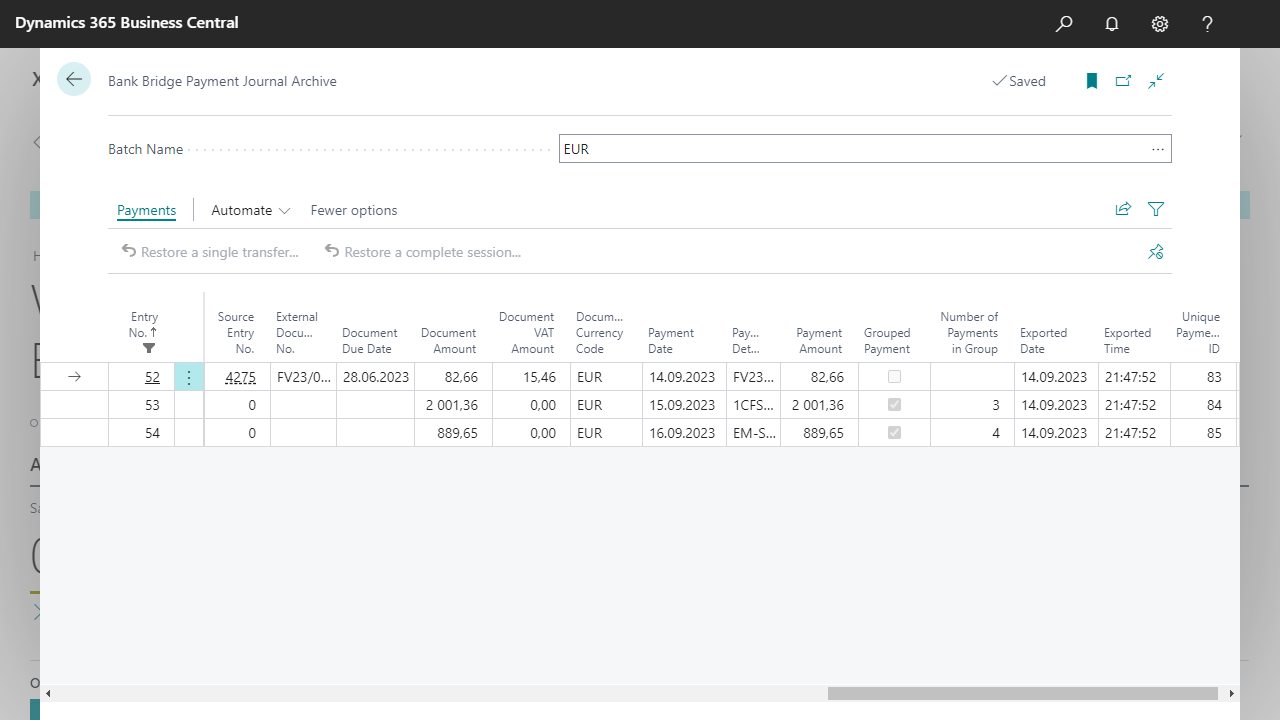
Select the image to inspect the archived entries and restore actions.
Restore a payment when a resend is needed
Restore payments when they need correction and another export, for example because the payment date or split-payment setting was incorrect. First establish the outcome of the original export at the bank.
Under Payments, use the action that matches the intended scope:
| Action | Scope |
|---|---|
| Restore a single transfer... | Return one transfer to Bank Bridge Payment Journal. |
| Restore a complete session... | Return the transfers sharing one session ID to Bank Bridge Payment Journal. |
A session is the set of transfers belonging to the same session ID. Check its scope before restoring the whole session when only one payment needs correction.
- In the archive, find the transfer or session that needs correction.
- Choose the appropriate restore action under Payments.
- Open Bank Bridge Payment Journal and review the restored payments.
- Correct the relevant values, such as Payment Date or Split Payment, and review the entire set being sent.
- After resolving the original export at the bank, choose Export to create the corrected file or send the corrected payments through the API.
What happens to the original archive record
The restored archive record remains in the archive and is marked Restored. It cannot be restored a second time.
The Restored flag does not change payment suggestion behavior. Suggest Vendor Payments... still finds the payment in the archive and will not generate another proposal for it. The flag records that the transfer has already been restored and prevents the same archive record from being restored again.
To correct and resend the payment, work with the transfer that restoration has already returned to Bank Bridge Payment Journal, then choose Export after reviewing the correction and the original batch's status at the bank.
Prevent authorization of both the original and the corrected payment
Restoring payments in Business Central does not withdraw the original batch from the bank. Reject or withdraw the incorrect batch there, or do not upload the incorrect export file. The user must ensure that the same operation is not authorized twice. If the bank has already processed the original payment, establish its actual status before taking further action.
Bank statement records
Bank Bridge also provides an archive of bank statements. The Bank Bridge Statements list includes an Archive column. Use the bank account, statement number and date to identify a statement.
For statements, Restore Statement... only clears the archived status so that the statement can be edited and processed again. Existing Cash Receipt Journal lines and posted entries remain unchanged; any required cleanup or posting reversal must be performed manually. Follow Restore and reprocess a statement for the relevant procedure.