Operation code mapping
Use operation code mappings to assign an account to statement transactions such as bank charges, interest or internal transfers. These transactions may not identify a customer or vendor.
A mapping connects a Bank Account No. and Operation Code with an Account Type and Account No. Review the bank's codes before creating the mappings.
Create a mapping
- Open Bank Bridge Operation Code Mapping.
- Choose New, or use Edit List to maintain the entries.
- Enter the Bank Account No. for which the mapping applies.
- Enter the Operation Code supplied in that bank's statement data.
- Add a Description that explains the operation.
- Select the destination Account Type and Account No.
- Review the mapping before processing a statement that uses the code.
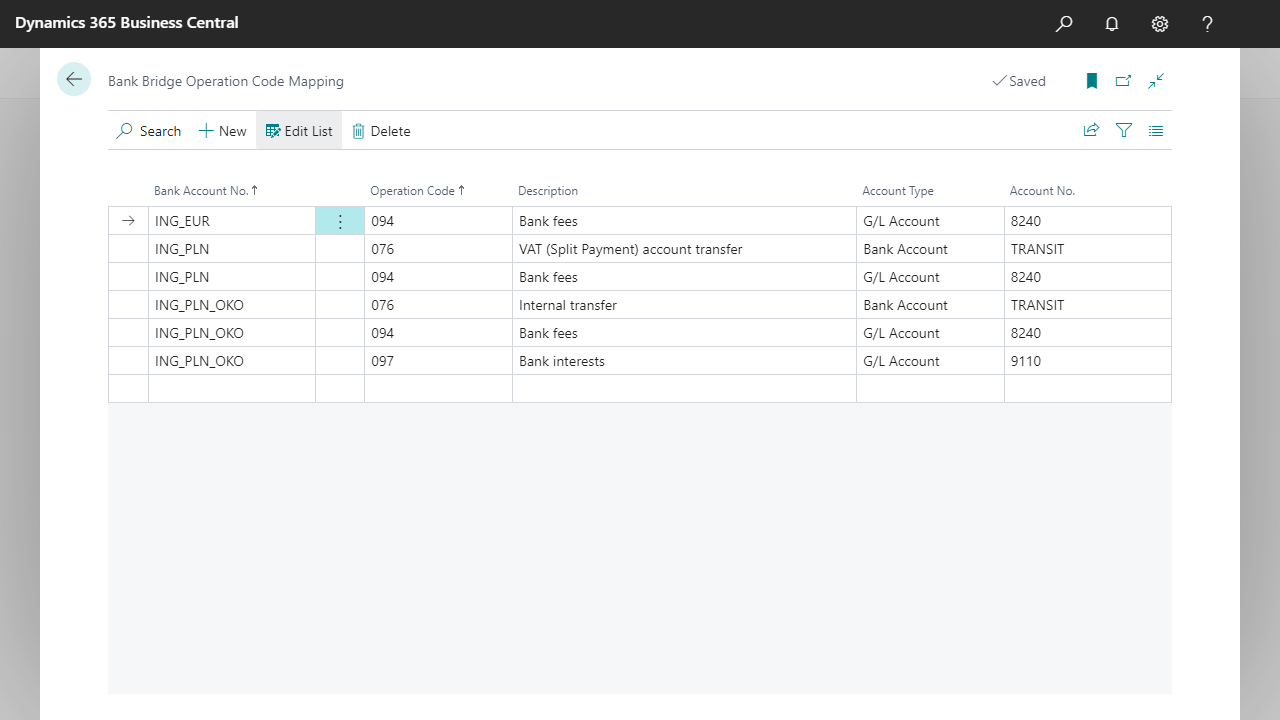
Select the image to view the mapping examples at full size.
Understand the fields
| Field | Purpose |
|---|---|
| Bank Account No. | The Business Central bank account associated with the mapping. |
| Operation Code | The bank's identifier for the transaction type. |
| Description | A readable explanation of the operation. |
| Account Type | The type of account to assign to the transaction, such as G/L Account or Bank Account. |
| Account No. | The account to use for the selected account type. |
Example: map a bank fee
The screenshot contains a mapping for bank account ING_EUR, operation code 094, with the description Bank fees. Its destination is G/L Account 8240.
This illustrates how a fee can be assigned to a G/L account during statement processing. Use the operation codes supplied by your bank and the accounts from your own chart of accounts. The example numbers are not universal setup values.
The screenshot also shows mappings to a Bank Account for internal transfers. Choose the account type according to the transaction and your accounting setup.
Verify the result
After importing a statement, find a line with the mapped operation code. Check its Account Type and Account No. before sending the statement to the journal.
If the result is unexpected, compare the line's bank account and operation code with the mapping. Correct the setup and review the affected transaction before posting.