Outgoing payments
Prepare payments in the Bank Bridge Payment Journal. The journal provides payment suggestions and actions for grouping several payments for one vendor into a single transfer.
Before starting, configure the journal template and batch. The template controls general payment rules; the batch provides the currency and payment method filters, export format and service settings.
Prepare a payment proposal
- Open Bank Bridge Payment Journal.
- Select the appropriate Batch Name.
- Under Prepare, choose Suggest Vendor Payments... to prepare the proposal.
- Review the resulting lines before grouping or exporting payments.
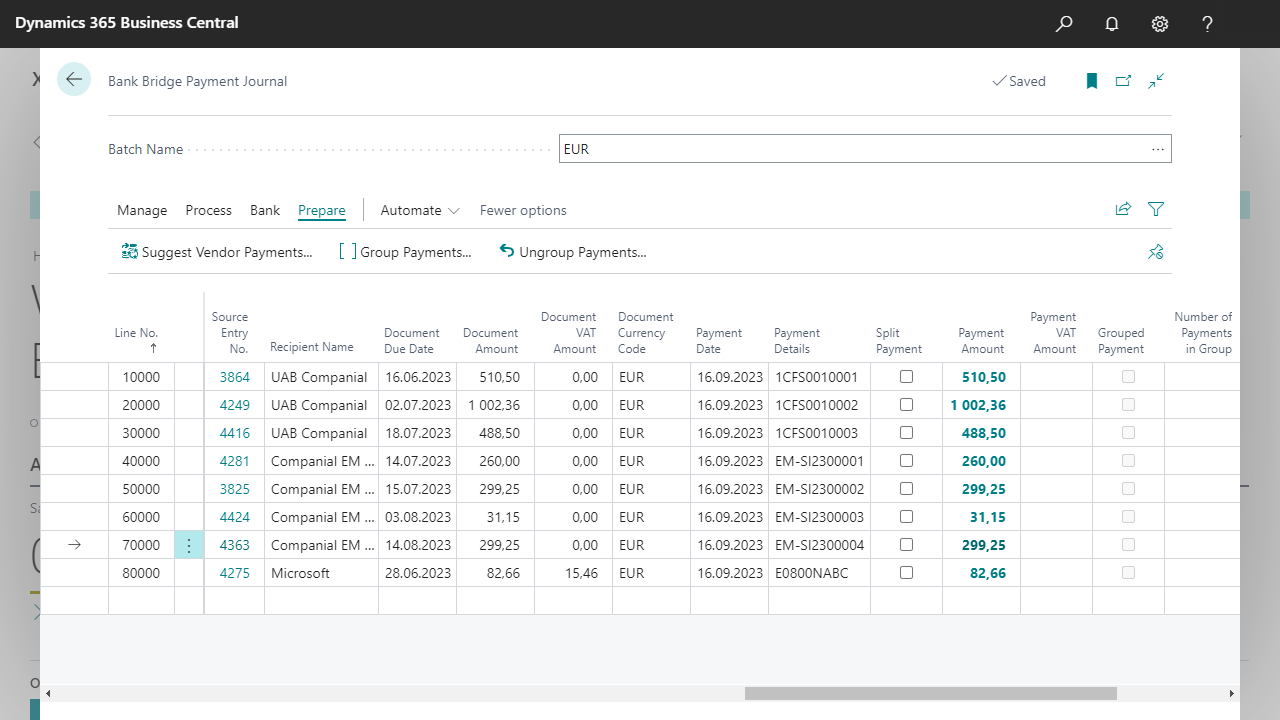
The example shows the EUR batch. Select the image to inspect the journal fields.
Review the proposed payments
Check that the proposed recipients, bank details, amounts and currencies match the payments you intend to make. The journal includes the following fields:
| Field | What to check |
|---|---|
| Source Entry No. | The entry from which the payment was prepared. |
| Recipient Name | The intended recipient. |
| Document Due Date | The due date of the source document. |
| Document Amount | The source document amount shown in the proposal. |
| Document Currency Code | The currency of the source document. |
| Payment Date | The requested payment date. |
| Payment Details | The reference or description to accompany the transfer. |
| Payment Amount | The amount to be paid. |
| Grouped Payment | Whether the line represents a grouped payment. |
| Number of Payments in Group | The number of payments included in the group. |
The screen also includes Split Payment, Document VAT Amount and Payment VAT Amount. Review these where applicable to the payment type and configured bank integration. Split Payment is also one of the payment grouping criteria.
Group payments for one vendor
Use Prepare > Group Payments... when several payments should be combined into one transfer. Bank Bridge groups payments using all four of these criteria:
| Criterion | Grouping rule |
|---|---|
| Vendor number | Payments must belong to the same vendor. |
| Vendor bank account number | Payments must use the same vendor bank account. |
| Currency code | Payments must have the same currency code. |
| Split Payment | Payments must have the same split-payment setting. |
Payments that differ in any of these values belong to different groups. For example, invoices for one vendor will remain in separate groups if they use different bank accounts or split-payment settings.
After grouping, review the resulting payment amount, recipient, payment details and number of payments in the group. Confirm that the grouped transfer represents the documents you intended to pay.
Use Prepare > Ungroup Payments... when you need to return to separate payments, then review the resulting lines again.
Export or send the payments
After reviewing the proposal, choose Export in Bank Bridge Payment Journal. Bank Bridge uses the export format and service configuration defined for the batch.
- File exchange: generate the payment file, then upload it using the bank's import process. Review the imported payments and complete any approval required by the bank.
- API connection: submit the payments through the configured integration, where supported. Review the result and complete any remaining bank approval steps.
Payments move to the archive when they are exported to a file or sent through the API. Archiving does not wait for a response from the bank and does not confirm bank authorization or execution.
Check the bank's result before resending
If a payment needs correction and a new export, prevent the original from being authorized as well. Reject or withdraw the incorrect batch at the bank, or do not upload the incorrect file. Check the bank's actual processing status before sending the replacement.
Review the archive
Use the Bank Bridge Payment Journal Archive to review processed transfers and, when appropriate, restore a single transfer or a complete session.
After restoration, the payments return to Bank Bridge Payment Journal for correction and another export. The original archive entries are marked Restored and cannot be restored again. Subsequent Suggest Vendor Payments... runs continue to exclude those payments because they remain recorded in the archive. Correct and export the restored transfers directly from the journal.