General setup
Open Debt Collector Setup using Business Central search. These settings apply to Debt Collector processing in the current company.
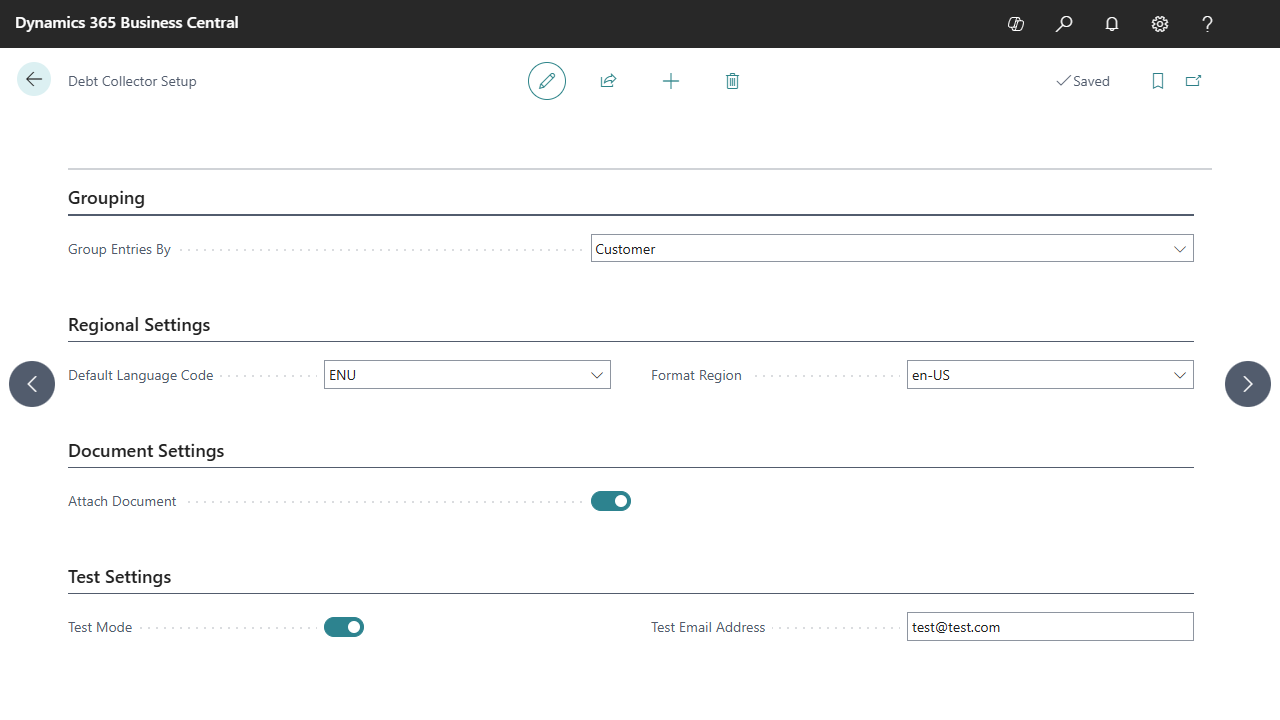
Select the image to view the setup fields at full size. Values shown are examples.
Grouping
| Group Entries By | Result |
|---|---|
| Customer | Combines eligible invoice entries for a customer into a message with an invoice table. Configuration-row processing determines which entries are included in each message. |
| Document | Prepares a separate message for each selected invoice entry. |
Customer grouping does not split messages by currency. If a customer has invoices in several currencies, use a layout that identifies the currency of each line and review how it presents totals. See Configurations and date rules for row processing and template selection.
Regional and document settings
| Field | Use |
|---|---|
| Default Language Code | Language used to resolve a template layout when the customer has no Language Code. Maintain the corresponding language rows in your templates. |
| Format Region | Available as a setup field. In version 1.0.2.0, the email text formatter does not apply this field. Verify the rendered date and number formats in the chosen report/layout during implementation. |
| Attach Document | Enables creation of PDF invoice attachments when the source posted document and its report selection are available. |
Read Email templates and languages for language selection, report layouts and attachment prerequisites.
Pilot settings
Enable Test Mode and enter Test Email Address when running the implementation pilot. Review the prepared recipient and output before sending the pilot messages. Disable Test Mode before preparing normal customer communication.
The full pilot sequence is in Getting started.